- Other Expenses can be added to an Invoice in QuickBooks.
- However, due to limitations imposed by QuickBooks, you cannot transfer Other Expenses to Timesheets in QuickBooks.
- Travel Time is not an Other Expense. Please refer to the Travel Time documentation to learn more.
Other Expenses
Other Expenses
Other Expenses are services you bill the Client for that are not scheduled.
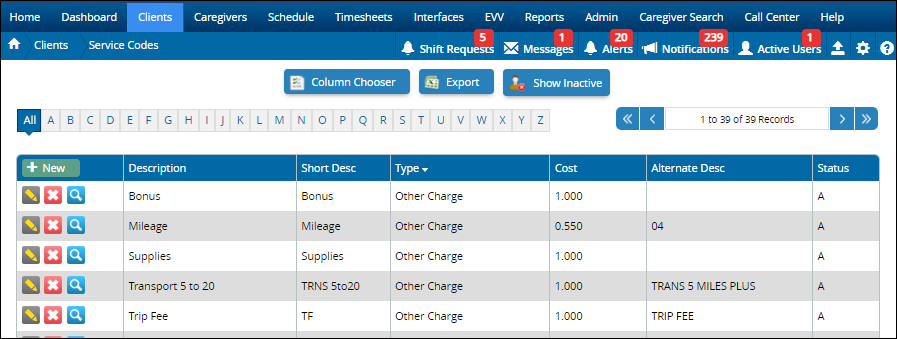
- Other Expenses are maintained in the Service Code Master List.
- Examples of Other Expenses: agency fee, bonus, gas reimbursement, initial client deposit, mileage, parking, and supplies.
- Other Expenses are entered on a shift, in Edit Timesheets, or imported directly from Generations EVV.
Note
Add An Other Expense
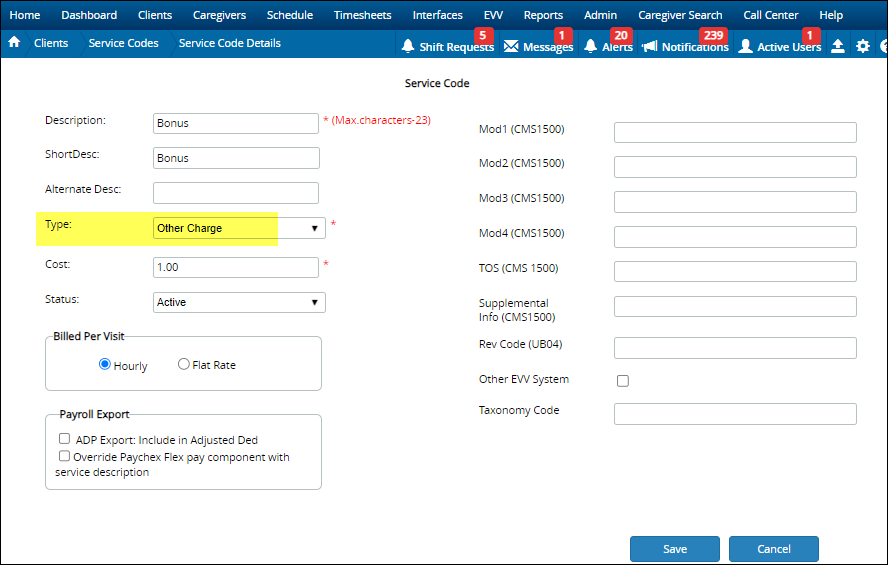
Other Expenses are added to the Service Code Master List. Be sure the type is "Other Charge."
Add Other Expenses To Schedules
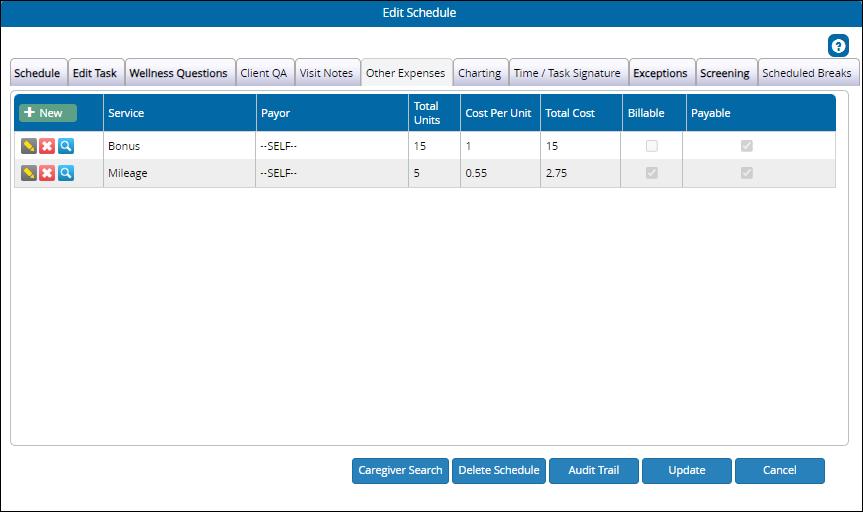
This works much as Other Expenses in Edit Timesheets. Any Other Expenses added to the shift from scheduling carries over to Timesheets, and into billing and payroll.

- Click +New.
- Select the Other Expense.
- Select Payor if appropriate.
- Add total units
- Cost per unit is added automatically from Service Codes.
- Total Cost is calculated for you.
- Billable: Add a checkmark if the item should be billed to the client.
- Payable: Add a checkmark if the item should be paid to the caregiver.
There can be multiple Other Expenses on a schedule.
Edit Timesheets
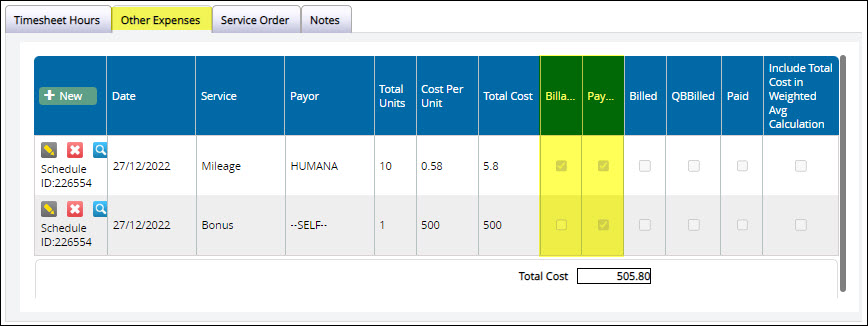
In Edit Timesheets, select a caregiver and client combination and scroll down to the actual Timesheet Hours. From there, select the Other Expenses tab.
- Indicate if an item is billable, payable, or both.
- Include Total Cost in Weighted Avg. Calculation: If checked, and the amount is payable, the Overtime weighted average calculation will consider the total cost from other expenses.
- If mileage is imported from Generations EVV, make changes or delete on the Schedules.
- If you add an Other Expense in Edit Timesheets, it does not appear on Schedules.
Link Other Expenses To QuickBooks
Because these are Other Expenses, you cannot link them directly to an income account in QuickBooks.
- Establish a link between the Other Expense Item and an expense account.
- Browse to your QuickBooks Items List and find the item you just linked.
- Change the account to an appropriate income account.
Reports
Other Expenses display on billing and payroll reports:
- Other Expenses by Client is listed under Billing Reports
- Other Expenses by Caregiver is listed under Timesheet/Payroll Reports.
Related Articles
Other Expenses
Other Expenses Other Expenses are services you bill the Client for that are not scheduled. Other Expenses are maintained in the Service Code Master List. Examples of Other Expenses: agency fee, bonus, gas reimbursement, initial client deposit, ...Billing and Payroll Best Practice Detail
Billing and Payroll Best Practice Detail Here is a step-by-step breakdown of the recommended best practices for doing billing and payroll from Generations. Basic Steps Regardless of whether you’re doing billing or payroll, the basic steps are: Update ...Billing and Payroll Best Practice Detail
Billing and Payroll Best Practice Detail Here is a step-by-step breakdown of the recommended best practices for doing billing and payroll from Generations. Basic Steps Regardless of whether you’re doing billing or payroll, the basic steps are: Update ...Illinois HHAX
Illinois HHAX Private notes DO NOT PUBLISH! See https://youtrack.idb-sys.com/issue/GEN-3620/Illinois-EVV-HHAX-IL Agency thought they needed HHAX, but they do not provide the services for DHS IDDD Holding in case we do have an agency that requires ...