Late Timesheets Best Practices
Late Timesheets Best Practices
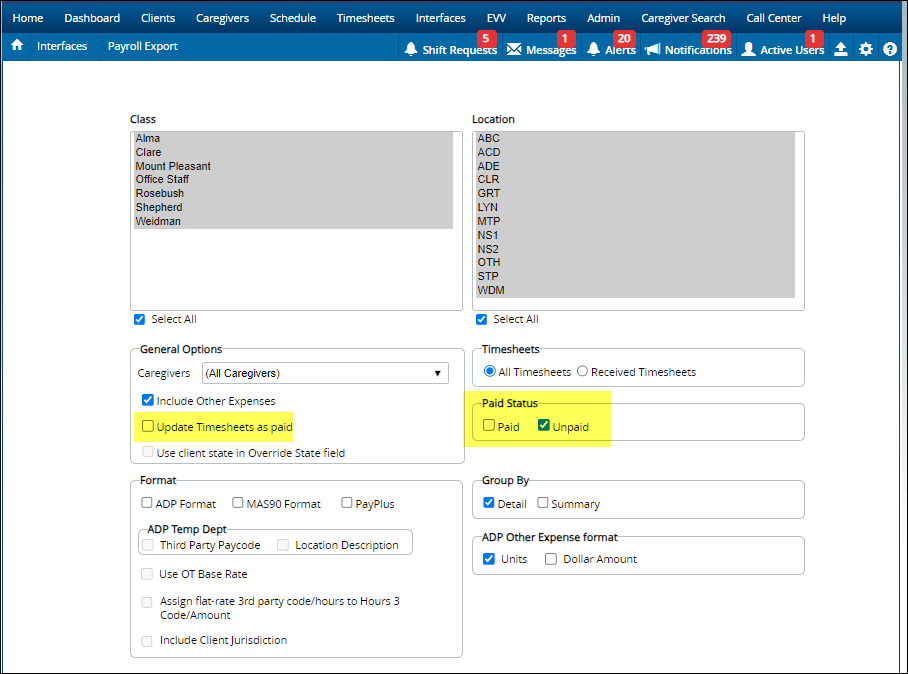
The key to running late Timesheets accurately is using paid and unpaid correctly. When you do a payroll export or transfer Timesheets to QuickBooks, the Timesheets are marked as paid. The 'unpaid' box allows Generations to determine which Timesheets for the given time period are NOT paid.
Timesheets to QuickBooks
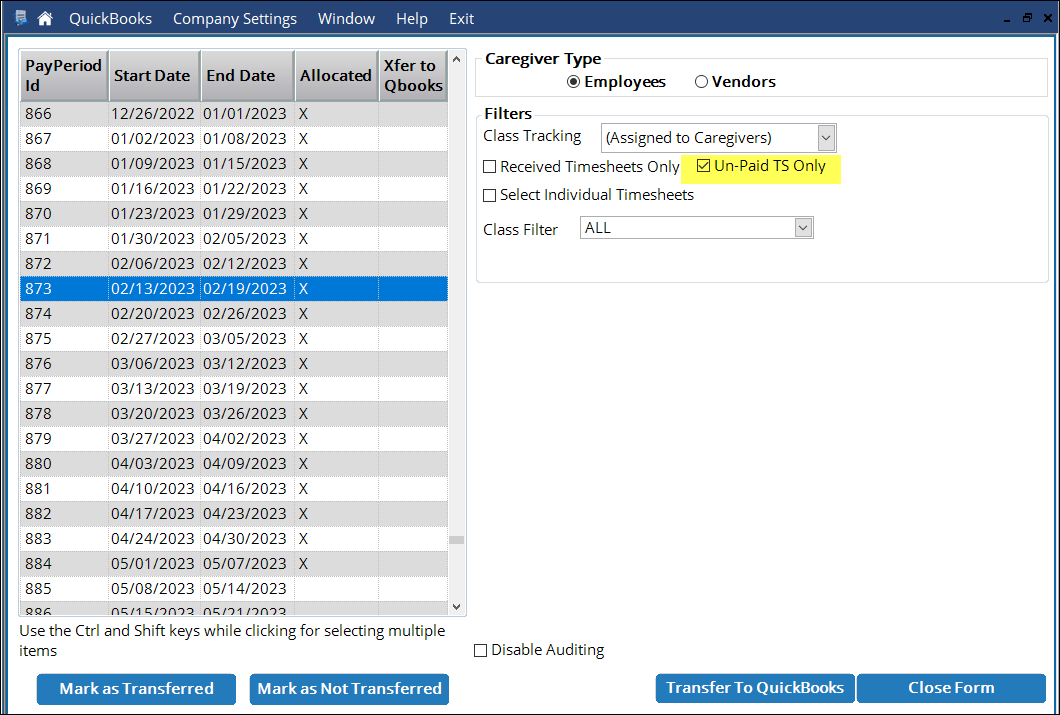
Generations transfers Timesheets to QuickBooks with ease. However, in the case of late timecards from Caregivers, stop before you process Timesheets.
When QuickBooks pulls information from their Timesheets to create paychecks, it only pulls from the most recent time period. So while a late Timesheet entered in Generations correctly goes to the proper time period in QuickBooks, you run into an issue when you try to create a paycheck. In fact, QuickBooks will only pull from the most recent time period: it does not pull time information submitted late. For this reason, you must manually add the late shifts to the current paycheck.
If you have a lot of late timecards, we recommend that you track and make adjustments in QuickBooks as follows:
- Enter the late timecards information in Generations.
- Create Timesheets again. Please note: if you have already marked Timesheets as received, this will not work. You'll need to use the Edit Timesheets Mass Update to remove the Received checkmark, then create Timesheets, then re-mark the Timesheets as received.
- Run the Timesheet Detail Report for one or more periods and select unpaid time only. Save the report for use in Step 5.
- Transfer Timesheets to QuickBooks using the unpaid time option. This will create the items in QuickBooks and mark those Timesheets as Paid in Generations.
- Process your payroll as normal in QuickBooks and (using the Timesheet Detail Report from Step 3,) manually add the late shifts to the current paycheck.
For Independent Contractors (Bills to QuickBooks)
If you are sending bills to QuickBooks for your independent contractors, update Generations as normal and transfer to QuickBooks. When you pay bills, all outstanding bills are visible - including bills for a Caregiver who submitted a Timesheet late.
For Payroll Exports
If you use the Payroll Export (or ADP/Paychex,) follow these steps:
- Enter the late timecards information in Generations.
- Create Timesheets again. Please note: if you have already marked Timesheets as received, this will not work. You'll need to use the Edit Timesheets Mass Update to remove the Received checkmark, then create Timesheets, then re-mark the Timesheets as received.
- Run the Timesheet Detail Report and select unpaid time only.
- Run the payroll export and select unpaid time only.
- Review the export to ensure accuracy before submitting to your payroll vendor.
Related Articles
Late Timesheets Best Practices
Late Timesheets Best Practices The key to running late Timesheets accurately is using paid and unpaid correctly. When you do a payroll export or transfer Timesheets to QuickBooks, the Timesheets are marked as paid. The 'unpaid' box allows Generations ...Billing and Payroll Best Practice Detail
Billing and Payroll Best Practice Detail Here is a step-by-step breakdown of the recommended best practices for doing billing and payroll from Generations. Basic Steps Regardless of whether you’re doing billing or payroll, the basic steps are: Update ...Billing and Payroll Best Practice Detail
Billing and Payroll Best Practice Detail Here is a step-by-step breakdown of the recommended best practices for doing billing and payroll from Generations. Basic Steps Regardless of whether you’re doing billing or payroll, the basic steps are: Update ...Illinois HHAX
Illinois HHAX Private notes DO NOT PUBLISH! See https://youtrack.idb-sys.com/issue/GEN-3620/Illinois-EVV-HHAX-IL Agency thought they needed HHAX, but they do not provide the services for DHS IDDD Holding in case we do have an agency that requires ...Other Expenses
Other Expenses Other Expenses are services you bill the Client for that are not scheduled. Other Expenses are maintained in the Service Code Master List. Examples of Other Expenses: agency fee, bonus, gas reimbursement, initial client deposit, ...