Wellness Groups and Questions
Wellness Groups and Questions
Wellness is a way to monitor the client's well-being to potentially minimize ER visits and re-hospitalizations. Using Generations EVV Caregivers answer questions about the Client regarding things like blood pressure level, pain level, PT exercises, self-dressing, and more. In turn, the agency receives alerts based on those responses and thus can take appropriate action.
We added some Wellness Groups and Questions for you. Add additional items for your population.
- The Wellness Groups Master List is a broad, basic list of subjects.
- The Wellness Questions Master list is specific questions asked of the caregiver at the end of the shift.
- Both lists are under the Client list at the top of the Home screen or in the Client's Wellness tab.

Video
Watch a 32-minute Spotlight Session webinar about Tasks and Wellness from 2020.
Wellness Groups
Wellness Groups are categories or broad, basic subjects.
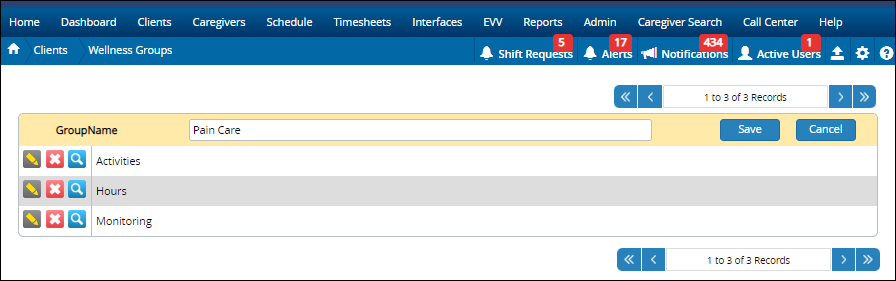
Add A Wellness Group
- Click +New
- Type the group name.
- Click save.
Wellness Questions
Wellness Questions are asked of the Caregiver upon completion of a shift, and can be used to monitor the well-being of the Client. The questions asked depend on your clients.

Buttons
- Status: Active or Inactive.
- Group Name: Click to show questions associated with specific Wellness Groups.
- 1 to 9 of 9 Records: click the arrows to move through the list.
- +New: Click to add a new item.
- Yellow Pencil: Click to edit an existing item.
- Red X: Click to delete an item.
- Magnifying Glass: Click to see who most recently updated this item.
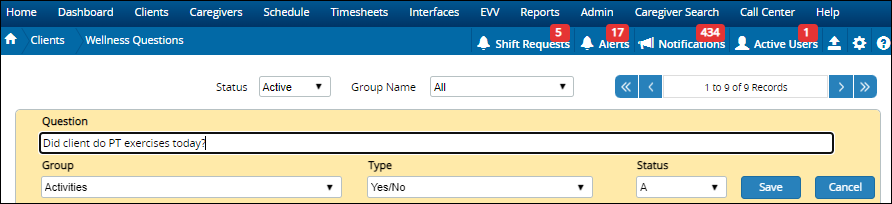
Add Wellness Questions
- Click +New.
- Type the question.
- Select Wellness Group. Each question must be assigned to a group.
- Select question type. The type can either be a Yes/No or Numeric. If the question is numeric, the answer can be a whole number (1,2,3, etc.) or decimals (5.5, 35.4, etc.) With decimals, the caregiver enters a * for the decimal like this: 10*25.
- Click Save.
Wellness in the Client File
- Assign Wellness Questions to a Client.
- Indicate which staff member should receive the alerts.
- Update future schedules

Wellness On Schedules
When adding or editing schedules, there is a Wellness tab. Add individual questions or copy existing questions from the Client's Wellness settings.

On the Caregiver Mobile App
Caregivers answer Wellness Questions on the mobile app.

Related Articles
Text via Email
Text via Email Text via Email uses an email address to send a text to a caregiver. That email address is the caregiver's cell phone number plus the correct format for their cell phone carrier. We use an API that transforms the email address into a ...Illinois HHAX
Illinois HHAX Private notes DO NOT PUBLISH! See https://youtrack.idb-sys.com/issue/GEN-3620/Illinois-EVV-HHAX-IL Agency thought they needed HHAX, but they do not provide the services for DHS IDDD Holding in case we do have an agency that requires ...Other Expenses
Other Expenses Other Expenses are services you bill the Client for that are not scheduled. Other Expenses are maintained in the Service Code Master List. Examples of Other Expenses: agency fee, bonus, gas reimbursement, initial client deposit, ...Other Expenses
Other Expenses Other Expenses are services you bill the Client for that are not scheduled. Other Expenses are maintained in the Service Code Master List. Examples of Other Expenses: agency fee, bonus, gas reimbursement, initial client deposit, ...Billing and Payroll Best Practice Detail
Billing and Payroll Best Practice Detail Here is a step-by-step breakdown of the recommended best practices for doing billing and payroll from Generations. Basic Steps Regardless of whether you’re doing billing or payroll, the basic steps are: Update ...